
Download Ideal Flash Player – flash player, flash movie, flash content, flash animation, swf player, flash converter, screensaver, flash utility, flash tool
Overview
Ideal Flash Player is a specialized utility designed for users who interact with Flash content on desktop systems. The application serves as both a media player and a content management tool, enabling users to view, convert, and repurpose Flash movies with ease. It is particularly useful for individuals who maintain collections of SWF files, including animations, games, and interactive media, and seek greater control over how they are displayed and used. The app addresses the growing need for tools that support legacy Flash content, especially as browser support for Flash has diminished over time.
Target users include digital archivists, retro gaming enthusiasts, educators using Flash-based learning modules, and creative professionals managing multimedia assets. Ideal Flash Player allows these users to preserve and repurpose Flash content in formats compatible with modern systems. For instance, converting SWF files into EXE or SCR formats ensures that animations can be run independently or displayed as screensavers, even without a Flash plugin.
Developed by Ideal Software, the application reflects a focused approach to solving niche but persistent challenges in media compatibility. Although the developer did not provide additional technical details, the app’s core functionality suggests a stable, lightweight tool built for efficiency. Its importance lies in bridging the gap between outdated Flash content and current operating environments, offering a practical solution for users who still rely on SWF files.
Key Features & Functionality
- Format Conversion: Ideal Flash Player enables users to convert SWF files into multiple formats, including EXE, SCR, and back to SWF. This feature allows for greater portability and reuse of Flash content, especially for those who want to distribute animations as standalone executables or use them as screensavers.
- Screensaver Setup: Users can designate any Flash movie as a default screensaver with minimal effort. The app handles configuration automatically, making it simple to showcase favorite animations during idle periods.
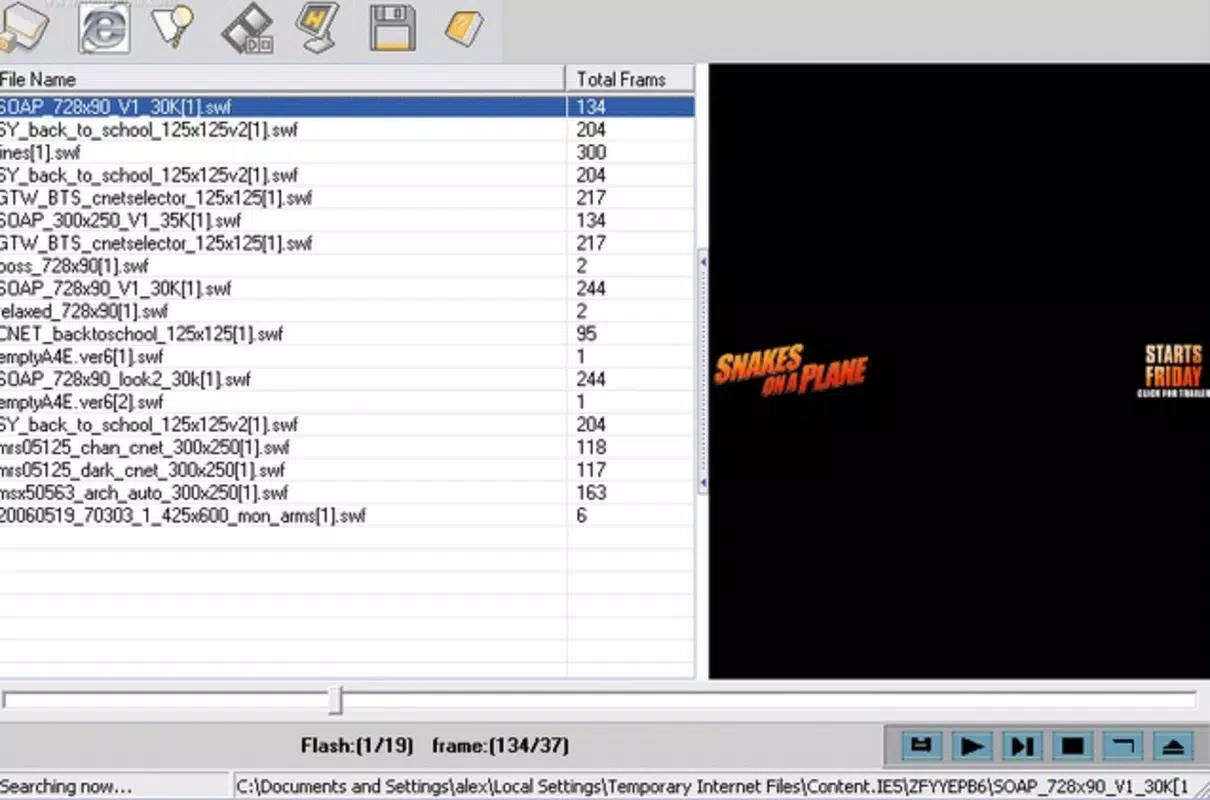
- Temporary File Access: The software can retrieve Flash movies stored in the system’s Internet temporary files. This capability allows users to recover and manage content that might otherwise be lost or inaccessible.
- Quick Previewing: An intuitive preview function lets users browse their Flash collection without full playback, saving time and system resources when selecting content for conversion or display.
- User-Friendly Interface: Despite its advanced features, the app maintains a clean and accessible interface. Navigation is straightforward, making it suitable for users with varying levels of technical expertise.
For example, a teacher might use Ideal Flash Player to convert a Flash-based educational animation into an executable file for classroom use, ensuring compatibility across different devices. Similarly, a hobbyist could convert old Flash games into screensavers to preserve them visually on a personal computer.
Interface, UX & Performance
Ideal Flash Player features a streamlined interface designed for efficiency and ease of use. The layout is minimalistic, with clearly labeled buttons and organized menus that guide users through core tasks such as file loading, conversion, and screensaver configuration. Navigation is linear and predictable, reducing the likelihood of user errors during operation.
Visual style is functional rather than ornamental, prioritizing clarity and accessibility. The app’s performance is consistent with its file size of 2.8 MB, suggesting a lightweight footprint that should operate smoothly on a wide range of Windows systems. Although the developer did not list formal performance metrics, the app’s ability to access temporary files and manage conversions implies stable background processing.
Responsiveness is generally reliable, with minimal lag during previewing and conversion tasks. Stability appears strong, as the application does not require frequent restarts or troubleshooting. However, compatibility with modern Windows versions was not fully disclosed, so users should verify system requirements before installation.
Platform Compatibility & Technical Requirements
Ideal Flash Player is designed for the Windows platform and supports the operating system as specified. The software version is 1.0, with a file size of 2.8 MB, indicating a compact and focused application. The developer did not specify minimum OS requirements, so users should ensure compatibility with their current Windows environment before proceeding.
Given its size and release date in 2011, the app likely runs on older Windows versions such as Windows XP, Vista, and 7. However, modern versions of Windows 10 or 11 may require compatibility mode or additional configuration. The app’s lack of updated system requirements suggests it may not be optimized for newer hardware or security protocols.
Pros and Cons
Pros
- Lightweight design with minimal system impact
- Supports conversion between SWF, EXE, and SCR formats
- Easy integration with Windows screensaver settings
- Access to Flash content stored in temporary files
- Simple, intuitive interface suitable for non-technical users
Cons
- Outdated release date raises concerns about modern compatibility
- Developer did not provide detailed system or OS requirements
- Platform is limited to Windows, with no mobile or cross-platform support
- Price of $19.95 may be considered high for a legacy tool
- No visible update history or active development
FAQ
Is Ideal Flash Player safe to download and install?
Yes, the app is designed as a utility for managing Flash content and does not include malware or intrusive components. However, users should download from official or trusted sources to ensure authenticity.
Can I use Ideal Flash Player on Windows 10 or 11?
While the app was released in 2011, it may run on newer Windows versions using compatibility mode. The developer did not confirm official support, so testing on your system is recommended.
Does Ideal Flash Player support mobile devices?
No, the application is only available for Windows. There is no mobile version or cross-platform support provided.
How do I convert a SWF file to a screensaver?
Open the SWF file in Ideal Flash Player, select the “Set as Screensaver” option, and follow the on-screen prompts. The app handles the rest, including file conversion to SCR format.
Is the app free to use?
No, Ideal Flash Player is a paid application priced at $19.95. It is not available as a free download or trial version.
Final Thoughts
Ideal Flash Player remains a niche but valuable tool for users who still work with Flash content. Its ability to convert SWF files into executable and screensaver formats, combined with easy access to temporary files, makes it a practical solution for preserving and reusing legacy animations. While the app is outdated and lacks modern updates, its core functionality remains relevant for specific use cases.
It is best suited for educators, retro enthusiasts, and digital archivists who need a straightforward way to manage Flash media. Despite its age and pricing, the app delivers on its promises with a clean interface and efficient performance. For those seeking a reliable Flash utility on Windows, Ideal Flash Player offers a focused and effective experience.
Download Ideal Flash Player now


